


Concept of the Vertex Tools (1.3.2) extension for SketchUp software
The Vertex Tools (1.3.2) extension is the Vertex editor tool for the SketchUp software, which has been created by Thomas Thomasson. The Vertex Tools (1.3.2) extension helps to allow the users to create landscapes for surveying, sculpting, freehand manipulations, and helps design organic projects. The Vertex Tools (1.3.2) extension also enables users to create smooth slopes and also helps to specify the slope distance in the design.
The Vertex Tools (1.3.2) extension is compatible with different versions of the SketchUp software, for example, SketchUp 2022, SketchUp 2023, SketchUp 2024, SketchUp 2025, and SketchUp 2026. The Vertex Tools (1.3.2) extension is also compatible with both Windows and Mac operating systems. The supporting languages for the Vertex Tools (1.3.2) extension are Spanish, English, French, Simplified Chinese, Korean, and Russian.
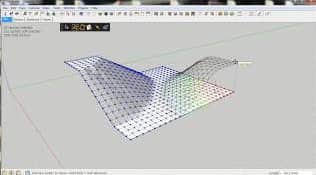
Discuss the features of the Vertex Tools (1.3.2) extension for SketchUp software
User interface of the Vertex Tools (1.3.2) extension
- The menus of the Vertex Tools (1.3.2) extension are located under the tool menu of the SketchUp software. From the submenus, the editing mode of the Vertex Tools has been activated. There are also other menus, including rotate, move, scale, and others, which act as shortcut hooks, used to assign shortcuts to different functions.
- The context menu is also available in the SketchUp software, which helps to provide access to the preferences and functions on the basis of the active Vertex editing tool.
- The auto-smooth feature of the Vertex Tools (1.3.2) extension leads to softening and smoothing the edges, thus helping to ensure a continuous surface.
- The Lock UV Mapping feature of the Vertex Tools (1.3.2) extension helps to lock the UV mapping of the textured faces when manipulated.
Tools of the Vertex Tools (1.3.2) extension
The tools of the Vertex Tools (1.3.2) extension help to modify the vertices tries to mirror SketchUp’s native tools.
- The select tool offers the selection of different shapes in the design. This tool offers several shape selection options, including the rectangular select tool, circular select tool, freehand select tool and plygo select tool.
- The MANIPULATOR GIZMO tool of the Vertex Tools (1.3.2) extension allows the users for quick manipulation in the design without switching out of the selection mode.
- The orientation lock feature ensures that the gizmo will retain the orientation when it is rotated.
- The move tool of the Vertex Tools (1.3.2) extension enables users to pick the design objects and move their vertices with more precision.
Shortcuts of the Vertex Tools (1.3.2) extension
- The shortcuts of the Vertex Tools (1.3.2) extension have been assigned using the shortcut manager of the SketchUp software.
Proxy functions of the Vertex Tools (1.3.2) extension
- There are some menus in the Vertex Tools (1.3.2) extension which have double functions, which enable users to have their shortcuts functioning inside and outside the Vertex mode, as these menus act as proxies. The available proxy functions of the Vertex Tools (1.3.2) extension are select feature, move feature, rotate feature, scale feature, invert selection feature, select all feature and select none feature.
Translation feature of the Vertex Tools (1.3.2) extension
- The Vertex Tools can also be translated into different languages, and this can be done by creating simple .lang files located in the Localisation folder.
How to download the Vertex Tools (1.3.2) extension for SketchUp software?
To download the Vertex Tools (1.3.2) extension for SketchUp software, the user has to visit the SketchUcation Plugin Store. The user can also grab the trial version of the Vertex Tools (1.3.2) extension from the SketchUcation Plugin Store.
To install the RBZ package of the Vertex Tools (1.3.2) extension, the user has to open the Extension Manager Window, go to Preferences and click on the Extensions option. Then the user has to click on the Install Extension button, and then they can browse the RBZ package of the Vertex Tools (1.3.2) extension.
In the case of using the older version of the SketchUp software, the Vertex Tools (1.3.2) extension should be installed manually. In this context, the user has to download the ZIP file to their computer. This ZIP file contains a file, tt_vertex.rb and a folder TT_Vertex, which should be extracted to the plugin folder of the SketchUp software. The location of the plugin folder has differed from platform to platform.
